✓ AV Scanned Clean
Build: 1.0.0
Size: 225 KB
Updated: 2021.09.26
Sonic 3 A.I.R. – Mania Style Data Select
⬇ Jump to Download Mirrors
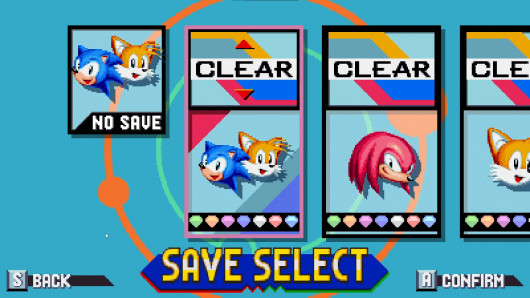
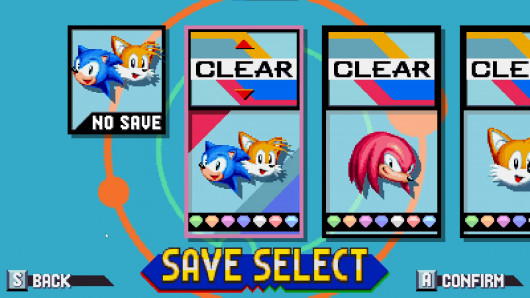
Sonic 3 A.I.R. – Mania Style Data Select (1.0.0) for Windows PC: Sonic 3 A.I.R.'s Data Select menu has never looked so Mania!
Game: Sonic 3 A.I.R.
Release Type: PC Mod
Version: 1.0.0
Genres: PC
Developer: PCVault
Archive Size: 225 KB
Platform: Windows 10 / 11 (64-bit)
Security Scan: ✓ AV Scanned: Clean


Sonic 3 A.I.R. PC Mod – Key Features & Notes
- Built with the help of Veenee 's
- powerful Data Select Character Sprite Mod Support 2.3.1.0, this mod has
- these features:
- Smoothly pulsing selection rectangle
- Zone name abbreviations over their portraits (i.e. AIZ for Angel Island Zone)
- Emeralds lined up at the bottom of each save slot
- Rectangular save slots with pure black frames and translucent interiors
- Selected save frames decorated with colored triangles
How to Install Sonic 3 A.I.R. PC Mod on PC
- Download the Mania Style Data Select archive (.ZIP) from Mirror 1 or Mirror 2 below.
- Extract the contents into your Sonic 3 A.I.R. PC root/mods folder (Steam -> Browse Local Files).
- Launch the game in offline/single-player mode to enjoy the new mod features.
Sonic 3 A.I.R. PC Mod FAQ
Is this Sonic 3 A.I.R. pc mod safe to use on Steam?
Yes. All files are scanned clean (AV Scanned: Clean) and designed for offline/single-player PC use. Always back up your original save or config folder first.
Where is the Sonic 3 A.I.R. save & config folder located on Windows?
Most modern PC releases store user saves and Engine.ini files inside %LOCALAPPDATA%, %APPDATA%, or %USERPROFILE%\Saved Games.