
✓ AV Scanned Clean
Build: v1.0.9
Size: 114 KB
Updated: 2023.04.12
Celeste – Spirialis Helper
⬇ Jump to Download Mirrors
Celeste – Spirialis Helper (v1.0.9) for Windows PC: Help Madeline survive her inner demons on her journey to the top of Celeste Mountain, in this super-tight platformer from the creators of TowerFall. Brave hundreds of hand-crafted challenges, uncover devious secrets, and piece together the mystery of the mountain.
Game: Celeste
Release Type: FPS Boost Config
Version: v1.0.9
Genres: Action, Adventure, Indie
Developer: Maddy Makes Games Inc.
Archive Size: 113 KB
Platform: Windows 10 / 11 (64-bit)
Security Scan: ✓ AV Scanned: Clean
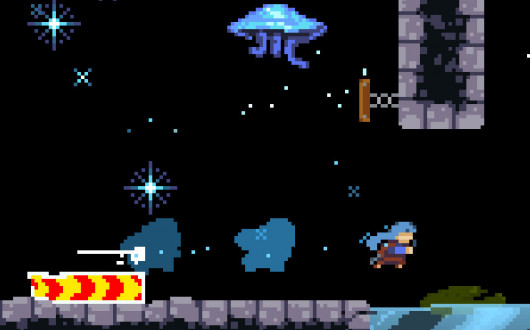

Celeste FPS Boost Config – Key Features & Notes
- Features include:
- Boost Pad – stationary block that will give a blockboost when you jump off of it.
- Floating Objects – make a decorative sprite appear to be floating on top of water, affected by ripples and such.
- Fixed Speed Trigger – Force Madeline to move with a fixed x- and/or y-speed after entering.
- More to be released at some point in the future.
Celeste PC System Requirements
Minimum Specs
- OS *: Windows 7 or newer
- Processor: Intel Core i3 M380
- Memory: 2 GB RAM
- Graphics: Intel HD 4000
- DirectX: Version 10
- Storage: 1200 MB available space
How to Install Celeste FPS Boost Config on PC
- Download the Celeste FPS & Stutter-Fix configuration .ZIP below and extract the preset files.
- Navigate to your Celeste configuration folder (%LOCALAPPDATA%\[Game]\Saved\Config\Windows or installation folder).
- Back up your default .ini file, drop in the optimized config, and launch the game for smoother frame pacing.
Celeste FPS Boost Config FAQ
Is this Celeste fps boost config safe to use on Steam?
Yes. All files are scanned clean (AV Scanned: Clean) and designed for offline/single-player PC use. Always back up your original save or config folder first.
Where is the Celeste save & config folder located on Windows?
Most modern PC releases store user saves and Engine.ini files inside %LOCALAPPDATA%, %APPDATA%, or %USERPROFILE%\Saved Games.
Buy the console and the game
| Item | Amazon | eBay |
|---|---|---|
| GTA 6 (PS5) | Amazon | eBay |
| GTA 6 (Xbox Series X) | Amazon | eBay |
| PlayStation 5 console | Amazon | eBay |
| Xbox Series X console | Amazon | eBay |
Links are affiliate links. We earn a small commission if you buy, at no extra cost to you.