
✓ AV Scanned Clean
Build: v1.0
Size: 822 B
Updated: 2025.04.17
Rivals of Aether II – Peppino (Pizza Tower) Loxodont
⬇ Jump to Download Mirrors
Rivals of Aether II – Peppino (Pizza Tower) Loxodont (v1.0) for Windows PC: Rivals of Aether II is the sequel to the hit indie fighting game, Rivals of Aether. Play as both new and returning elemental fighters in the next generation of platform fighters.
Game: Rivals of Aether II
Release Type: 100% Save-Game
Version: v1.0
Genres: Action, Indie
Developer: Aether Studios
Archive Size: 1 KB
Platform: Windows 10 / 11 (64-bit)
Security Scan: ✓ AV Scanned: Clean
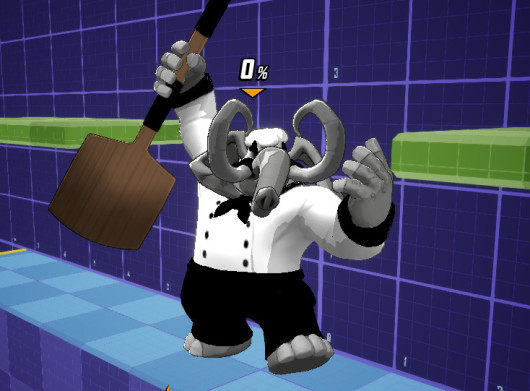
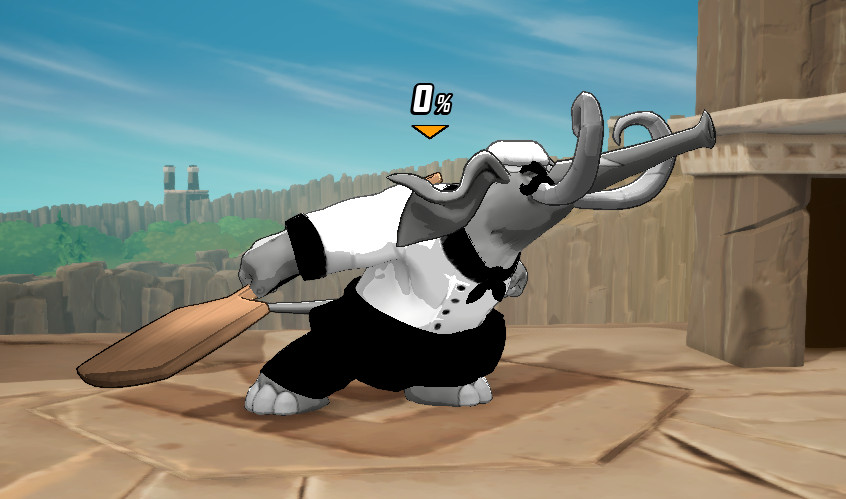
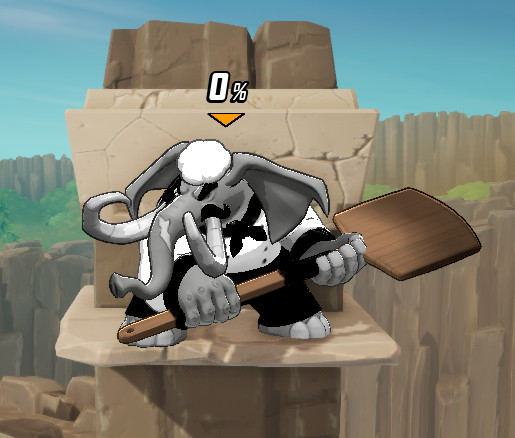
Rivals of Aether II 100% Save-Game – Key Features & Notes
- Peppino from Pizza Tower palette for Chef Loxodont!
- Peppino skin goes over the Red Chef Loxodont, substituting the skin's Red palette to look like Peppino.
- Install it in the Rivals 2 Paks folder
Rivals of Aether II PC System Requirements
Minimum Specs
- Requires a 64-bit processor and operating system
- OS: Window 10+ 64 Bit
- Processor: 3.0 GHz Dual core
- Memory: 8 GB RAM
- Graphics: NVIDIA GeForce GTX 1060, AMD Radeon RX 470, or better
- DirectX: Version 11
- Network: Broadband Internet connection
- Storage: 20 GB available space
Recommended Specs
- Requires a 64-bit processor and operating system
- OS: Window 10+ 64 Bit
- Processor: 3.5+ GHz Quad core
- Memory: 16 GB RAM
- Graphics: NVIDIA GeForce GTX 1060, AMD Radeon RX 470, or better
- DirectX: Version 11
- Network: Broadband Internet connection
- Storage: 20 GB available space
How to Install Rivals of Aether II 100% Save-Game on PC
- Download the Rivals of Aether II save-game .ZIP archive from the mirrors below and extract it.
- Press Win + R, open your Rivals of Aether II save directory inside %LOCALAPPDATA% or %USERPROFILE%\Saved Games (back up your existing save folder first!).
- Copy the extracted save files into your active profile folder, disable Steam Cloud overwrite if prompted, and launch the game.
Rivals of Aether II 100% Save-Game FAQ
Is this Rivals of Aether II 100% save-game safe to use on Steam?
Yes. All files are scanned clean (AV Scanned: Clean) and designed for offline/single-player PC use. Always back up your original save or config folder first.
Where is the Rivals of Aether II save & config folder located on Windows?
Most modern PC releases store user saves and Engine.ini files inside %LOCALAPPDATA%, %APPDATA%, or %USERPROFILE%\Saved Games.
Buy the console and the game
| Item | Amazon | eBay |
|---|---|---|
| GTA 6 (PS5) | Amazon | eBay |
| GTA 6 (Xbox Series X) | Amazon | eBay |
| PlayStation 5 console | Amazon | eBay |
| Xbox Series X console | Amazon | eBay |
Links are affiliate links. We earn a small commission if you buy, at no extra cost to you.



