
✓ AV Scanned Clean
Build: v1.0
Size: 2 MB
Updated: 2011.10.22
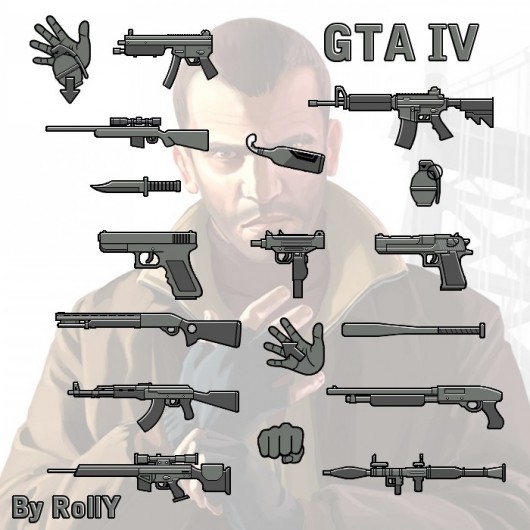
Grand Theft Auto IV – New HQ Icons
⬇ Jump to Download Mirrors
Grand Theft Auto IV – New HQ Icons (v1.0) for Windows PC: Niko Bellic, Johnny Klebitz and Luis Lopez all have one thing in common – they live in the worst city in America. Liberty City worships money and status, and is heaven for those who have them and a living nightmare for those who don't.
Game: Grand Theft Auto IV
Release Type: 100% Save-Game
Version: v1.0
Genres: Action, Adventure
Developer: Rockstar North
Archive Size: 1646 KB
Platform: Windows 10 / 11 (64-bit)
Security Scan: ✓ AV Scanned: Clean


Grand Theft Auto IV 100% Save-Game – Key Features & Notes
- Description:
- Installation:
- 2. Browse to User/Program Files/Rockstar Games/Grand Theft Auto IV/pc/models/cdimages/weapons.img
- 3. Select the weapon you want in the bottom of the list (for example mp5.wtd)
- 4. Then click on Edit and select the file named Icon
- 5. Change the icon you want by importin the new one
- 6. Click on Save and Close then save again and it's done!
- 1. Browse to User/Program Files/Rockstar Games/Grand Theft Auto IV/pc/textures/hud.wtd with SparkIV
Grand Theft Auto IV PC System Requirements
Minimum Specs
- OS: Windows 10 (64-bit)
- Processor: Intel Core 2 Duo 1.8GHz, AMD Athlon X2 64 2.4GHz
- Memory: 1.5GB
- Graphics: 256MB Nvidia 7900 / 256MB ATI X1900
- DirectX Version: DirectX 9.0c Compliant Card
- Hard Drive: 22GB of Hard Disc Space
- Sound Card: 5.1 Channel Audio Card
How to Install Grand Theft Auto IV 100% Save-Game on PC
- Download the Grand Theft Auto IV save-game .ZIP archive from the mirrors below and extract it.
- Press Win + R, open your Grand Theft Auto IV save directory inside %LOCALAPPDATA% or %USERPROFILE%\Saved Games (back up your existing save folder first!).
- Copy the extracted save files into your active profile folder, disable Steam Cloud overwrite if prompted, and launch the game.
Grand Theft Auto IV 100% Save-Game FAQ
Is this Grand Theft Auto IV 100% save-game safe to use on Steam?
Yes. All files are scanned clean (AV Scanned: Clean) and designed for offline/single-player PC use. Always back up your original save or config folder first.
Where is the Grand Theft Auto IV save & config folder located on Windows?
Most modern PC releases store user saves and Engine.ini files inside %LOCALAPPDATA%, %APPDATA%, or %USERPROFILE%\Saved Games.
Buy the console and the game
| Item | Amazon | eBay |
|---|---|---|
| GTA 6 (PS5) | Amazon | eBay |
| GTA 6 (Xbox Series X) | Amazon | eBay |
| PlayStation 5 console | Amazon | eBay |
| Xbox Series X console | Amazon | eBay |
Links are affiliate links. We earn a small commission if you buy, at no extra cost to you.



