✓ AV Scanned Clean
Build: v1.0
Size: 482 KB
Updated: 2017.05.06
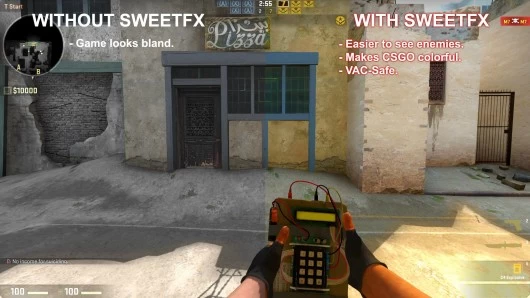
Counter-Strike: Global Offensive – SweetFX Digital Vibrance for CSGO.
⬇ Jump to Download Mirrors
Counter-Strike: Global Offensive – SweetFX Digital Vibrance for CSGO. (v1.0) for Windows PC: ~ SweetFX is 100% VAC-SAFE ~
Game: Counter-Strike: Global Offensive
Release Type: PC Mod
Version: v1.0
Genres: PC
Developer: PCVault
Archive Size: 482 KB
Platform: Windows 10 / 11 (64-bit)
Security Scan: ✓ AV Scanned: Clean


Counter-Strike: Global Offensive PC Mod – Key Features & Notes
- If SweetFX stopped working for you, or you can't get it to work then my advice is that you use vibrance.gui instead ( link ) if you have an Nvidia OR AMD graphics card.
- Steelseries Engine 3 & Razer Synapse are Stopping Sweetfx from working! Close them if you want to use Sweetfx.
- IF IT STOPS WORKING THEN PLEASE CHECK YOUR VIDEO OPTIONS AND MAKE SURE THAT MULTISAMPLING IS DISABLED!!!! OR IT WONT WORK.
- You will NOT get VAC banned because of SweetFX, I have been using it for more than 2000 hours of CSGO on 5 accounts without anything happening.
- To Install: (With Pictures) >- Copy from the zip to your steam/steamapps/common folder
- >- This should appear (press yes)
- >- Your "Counter-Strike Global Offensive" should look like this
- >- Last Step: Open CS:GO, Then click on "OPTIONS", choose VIDEO SETTINGS, THEN SET "Multisampling" To "None"
How to Install Counter-Strike: Global Offensive PC Mod on PC
- Download the SweetFX Digital Vibrance for CSGO. archive (.ZIP) from Mirror 1 or Mirror 2 below.
- Extract the contents into your Counter-Strike: Global Offensive PC root/mods folder (Steam -> Browse Local Files).
- Launch the game in offline/single-player mode to enjoy the new mod features.
Counter-Strike: Global Offensive PC Mod FAQ
Is this Counter-Strike: Global Offensive pc mod safe to use on Steam?
Yes. All files are scanned clean (AV Scanned: Clean) and designed for offline/single-player PC use. Always back up your original save or config folder first.
Where is the Counter-Strike: Global Offensive save & config folder located on Windows?
Most modern PC releases store user saves and Engine.ini files inside %LOCALAPPDATA%, %APPDATA%, or %USERPROFILE%\Saved Games.
Buy the console and the game
| Item | Amazon | eBay |
|---|---|---|
| GTA 6 (PS5) | Amazon | eBay |
| GTA 6 (Xbox Series X) | Amazon | eBay |
| PlayStation 5 console | Amazon | eBay |
| Xbox Series X console | Amazon | eBay |
Links are affiliate links. We earn a small commission if you buy, at no extra cost to you.



