
Persona 5 Royal (PC) – Persona 5 Royal Kamen Rider Geats Pack
⬇ Jump to Download Mirrors
Persona 5 Royal (PC) – Persona 5 Royal Kamen Rider Geats Pack (2.1.1) for Windows PC: Lead the Phantom Thieves of Hearts in this award winning, stylish turn-based RPG filled with dungeon crawling, party customization, strategic combat, and Persona fusion. Explore Tokyo, build relationships, battle Shadows, and infiltrate the minds of the corrupt to make them change their ways!

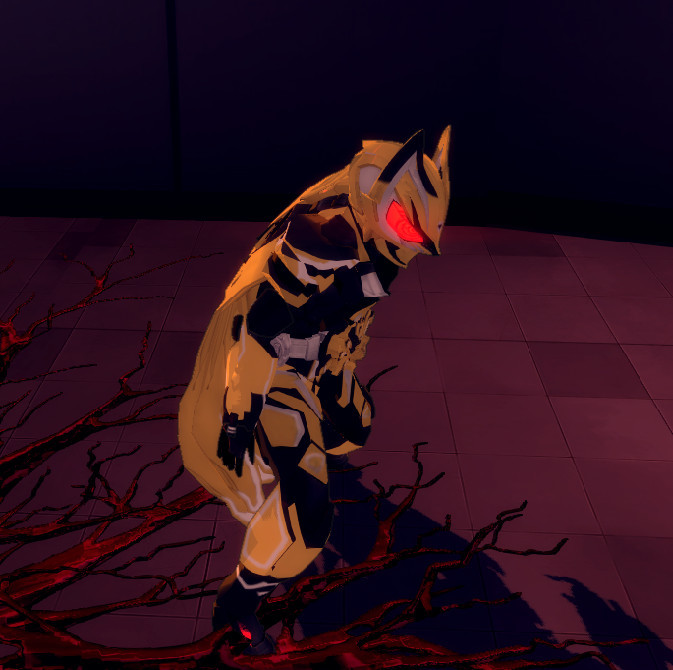
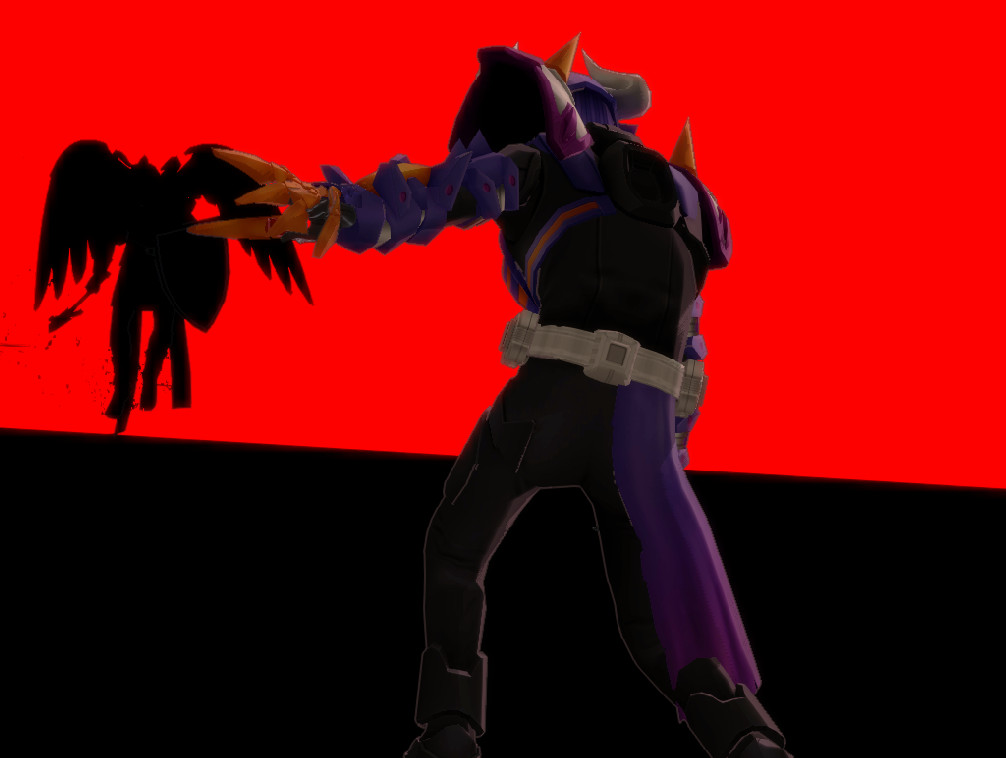

Persona 5 Royal (PC) FPS Boost Config – Key Features & Notes
- Model changes for Joker, Panther, Fox and Crow.
- Joker – Geats IX(NEW!), Tycoon Bujin Sword, Doom Geats, X Geats
- Panther – Na-Go Beat
- Crow – Buffa Zombie
- Cape physics for Doom Geats/X Geats replicated. As this is my
- As of 12/25/2025, this mod is considered finished by me. No further major updates will be made.
Persona 5 Royal (PC) PC System Requirements
Minimum Specs
- Requires a 64-bit processor and operating system
- OS: Windows 10
- Processor: Intel Core i7-4790, 3.4 GHz | AMD Ryzen 5 1500X, 3.5 GHz
- Memory: 8 GB RAM
- Graphics: Nvidia GeForce GTX 650 Ti, 2 GB | AMD Radeon R7 360, 2 GB
- DirectX: Version 11
- Storage: 41 GB available space
- Additional Notes: Low 720p @ 60 FPS. Requires a CPU which supports the AVX and SSE4.2 instruction set. Microsoft no longer supports Windows 10 or older versions.
Recommended Specs
- Requires a 64-bit processor and operating system
- OS: Windows 10
- Processor: Intel Core i7-4790, 3.4 GHz | AMD Ryzen 5 1500X 3.5 Ghz
- Memory: 8 GB RAM
- Graphics: Nvidia GeForce GTX 760, 2 GB | AMD Radeon HD 7870, 2 GB
- DirectX: Version 11
- Storage: 41 GB available space
- Additional Notes: High 1080p @ 60 FPS. Microsoft no longer supports Windows 10 or older versions.
How to Install Persona 5 Royal (PC) FPS Boost Config on PC
- Download the Persona 5 Royal (PC) FPS & Stutter-Fix configuration .ZIP below and extract the preset files.
- Navigate to your Persona 5 Royal (PC) configuration folder (%LOCALAPPDATA%\[Game]\Saved\Config\Windows or installation folder).
- Back up your default .ini file, drop in the optimized config, and launch the game for smoother frame pacing.
Persona 5 Royal (PC) FPS Boost Config FAQ
Is this Persona 5 Royal (PC) fps boost config safe to use on Steam?
Yes. All files are scanned clean (AV Scanned: Clean) and designed for offline/single-player PC use. Always back up your original save or config folder first.
Where is the Persona 5 Royal (PC) save & config folder located on Windows?
Most modern PC releases store user saves and Engine.ini files inside %LOCALAPPDATA%, %APPDATA%, or %USERPROFILE%\Saved Games.
Buy the console and the game
| Item | Amazon | eBay |
|---|---|---|
| GTA 6 (PS5) | Amazon | eBay |
| GTA 6 (Xbox Series X) | Amazon | eBay |
| PlayStation 5 console | Amazon | eBay |
| Xbox Series X console | Amazon | eBay |
Links are affiliate links. We earn a small commission if you buy, at no extra cost to you.



